Custom Lua Support
The Custom Lua Support (or CLS) was created to assist you further in adding your custom entries to seperate files, split from the original files, so it's easier to update the translation files. It's similar to the Multi-Iteminfo Support, but on a bigger scale.
Important
Be aware that mose of these files are only tested for lua errors and functionality regarding the original files.
In case you encounter errors, please use the discord for reporting it and PM me with your custom stuff so I can test them efficiently.
Warning
Before using any of these files be sure to make a backup of your original clients/files. You have been warned!
Installation
- Copy & Paste the
Custom Lua Files/datain your own folder and insert the custom entries/values from the current files into the new ones indata/luafiles514/lua files/clsfolder, the same way as you did before. - Afterwards you add the
data/luafiles514/lua files/clsfolder in your GRF and your are done. - Apply the patches via WARP or NEMO; See below for details.
- Test it and report any issues you might experience.
Tested Files
- Mob/NPC/Pets
- Headgear
- Weapon
- Random Options
- Shadow Table
- HatEffectInfo
- LapineBoxes
- DrawItemonAura
- TB_Layer_Priority
Update - 31st August 2024
I moved the CLS for quests to the Additions folder as they can't make use of this anyway.
To make use of that, start the Tools/AdditionsGenerator.bat.
WARP
In WARP select the following patch:

The patch will open an input window, where that config file is located and you can open it in your text editor as well.
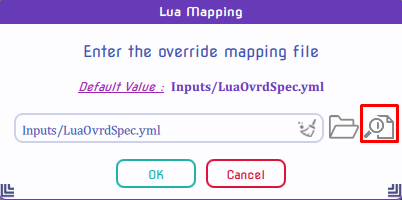
In this file you can decide which the paths should be applied and which not:
If you want to disable certain entries, put an # in front of them.
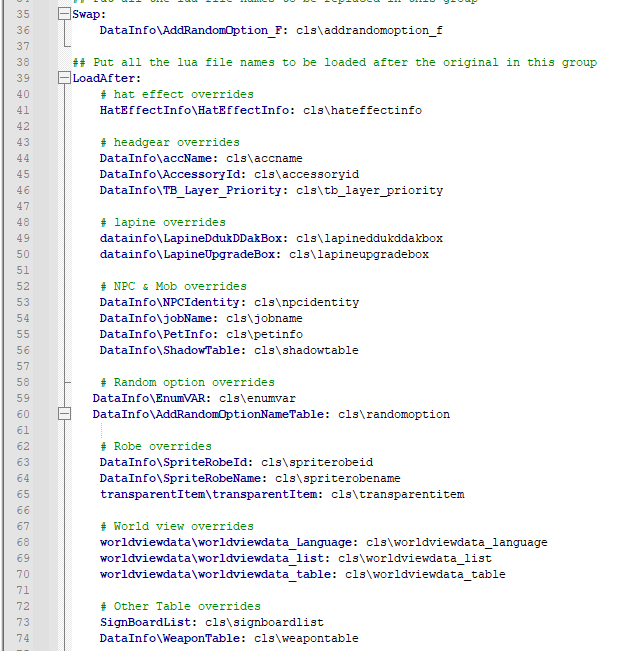
Update - 18th January 2025
Duo to these changes the original file will look different than shown above,
until WARP updates from my PR.
So until the PR were merged or the files updated, please use this to overwrite it:
Note
This will be deleted afterwards of course.
Info
Swap:
	DataInfo\AddRandomOption_F: cls\addrandomoption_f

## Put all the lua file names to be loaded after the original in this group
LoadAfter:
	# hat effect overrides
	HatEffectInfo\HatEffectInfo: cls\hateffectinfo

	# headgear overrides
	DataInfo\accName: cls\accname
	DataInfo\AccessoryId: cls\accessoryid
	DataInfo\TB_Layer_Priority: cls\tb_layer_priority

	# lapine overrides
	datainfo\LapineDdukDDakBox: cls\lapineddukddakbox
	datainfo\LapineUpgradeBox: cls\lapineupgradebox

	# NPC & Mob overrides
	DataInfo\NPCIdentity: cls\npcidentity
	DataInfo\jobName: cls\jobname
	DataInfo\PetInfo: cls\petinfo
	DataInfo\ShadowTable: cls\shadowtable

	# Random option overrides
	DataInfo\EnumVAR: cls\enumvar
	DataInfo\AddRandomOptionNameTable: cls\randomoption

	# Robe overrides
	DataInfo\SpriteRobeId: cls\spriterobeid
	DataInfo\SpriteRobeName: cls\spriterobename
	transparentItem\transparentItem: cls\transparentitem

	# World view overrides
	worldviewdata\worldviewdata_Language: cls\worldviewdata_language
	worldviewdata\worldviewdata_list: cls\worldviewdata_list
	worldviewdata\worldviewdata_table: cls\worldviewdata_table

	# Other Table overrides
	SignBoardList: cls\signboardlist
	DataInfo\WeaponTable: cls\weapontable
This is to replace the original kRO functions with my customized version located in the cls folder.
As they contain some heavy edits, which prevents overwriting the original functions.
This is to load the files in the cls folder additionally to the original files.
Below you can find a list, which files are connected with each other to prevent any errors.
Connected Files
- HatEffect
- HatEffectInfo\HatEffectInfo: cls\hateffectinfo
- Headgear
- DataInfo\accName: cls\accname
- DataInfo\AccessoryId: cls\accessoryid
- DataInfo\TB_Layer_Priority: cls\tb_layer_priority
- NPC/Mob/Pet
- DataInfo\jobName: cls\jobname
- DataInfo\NPCIdentity: cls\npcidentity
- DataInfo\PetInfo: cls\petinfo
- DataInfo\ShadowTable: cls\shadowtable
- Random Options
- DataInfo\AddRandomOption_F: cls\addrandomoption_f
- DataInfo\EnumVAR: cls\enumvar
- DataInfo\AddRandomOptionNameTable: cls\randomoption
- Lapine Boxes
- datainfo\LapineDdukDDakBox: cls\lapineddukddakbox
- datainfo\LapineUpgradeBox: cls\lapineupgradebox
- Robes (Costume Garments)
- DataInfo\SpriteRobeId: cls\spriterobeid
- DataInfo\SpriteRobeName: cls\spriterobename
- transparentItem\transparentItem: cls\transparentitem
- Weapons
- DataInfo\WeaponTable: cls\weapontable
- Signboard
- SignBoardList: cls\signboardlist
- World Map
- worldviewdata\worldviewdata_Language: cls\worldviewdata_language
- worldviewdata\worldviewdata_list: cls\worldviewdata_list
- worldviewdata\worldviewdata_table: cls\worldviewdata_table
NEMO
Note
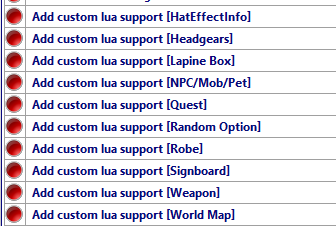
4144 still has to code a different logic to make the World Map Support work, but everything else works so far:
Just apply the patches you want and it should work!
Update - 18th January 2025
Duo to the recent changes, the current patch file needs some adjustments, until NEMO updates from my PR. So until the PR was merged or the files updated, please follow these steps to make sure the patches will work:
Manual Changes
- Open NEMO/Patches folder
- Open each patch for CLS (named AddCLS*.qs) and delete the
lua.replacelines
If you findif (pe.stringRawbefore alua.replace, remove the whole block as well.
Looks like this (Example fromAddCLSRobe.qs):
function AddCLSRobe()
{
	lua.replace("Lua Files\\DataInfo\\SpriteRobeName_F", ["lua files\\cls\\spriterobename_f"]);
	if (pe.stringRaw("Lua Files\\transparentItem\\transparentItem_f") !== -1 || table.get(table.packetVersion) > 20171000)
	{
		lua.replace("Lua Files\\transparentItem\\transparentItem_f", ["lua files\\cls\\transparentitem_f"]);
	}

	lua.loadBefore("Lua Files\\DataInfo\\SpriteRobeId", ["lua files\\cls\\spriterobeid"]);
	lua.loadBefore("Lua Files\\DataInfo\\SpriteRobeName", ["lua files\\cls\\spriterobename"]);
	if (pe.stringRaw("Lua Files\\transparentItem\\transparentItem") !== -1 || table.get(table.packetVersion) > 20171000)
	{
		lua.loadBefore("Lua Files\\transparentItem\\transparentItem", ["lua files\\cls\\transparentitem"]);
	}

	return true;
}
function AddCLSRobe()
{
	lua.loadBefore("Lua Files\\DataInfo\\SpriteRobeId", ["lua files\\cls\\spriterobeid"]);
	lua.loadBefore("Lua Files\\DataInfo\\SpriteRobeName", ["lua files\\cls\\spriterobename"]);
	if (pe.stringRaw("Lua Files\\transparentItem\\transparentItem") !== -1 || table.get(table.packetVersion) > 20171000)
	{
		lua.loadBefore("Lua Files\\transparentItem\\transparentItem", ["lua files\\cls\\transparentitem"]);
	}

	return true;
}
I know a lot of work, but once that is complete for each patch, there will be no errors at least.